Quantitative analysis
Pulse
Streak odds from the chart's own history
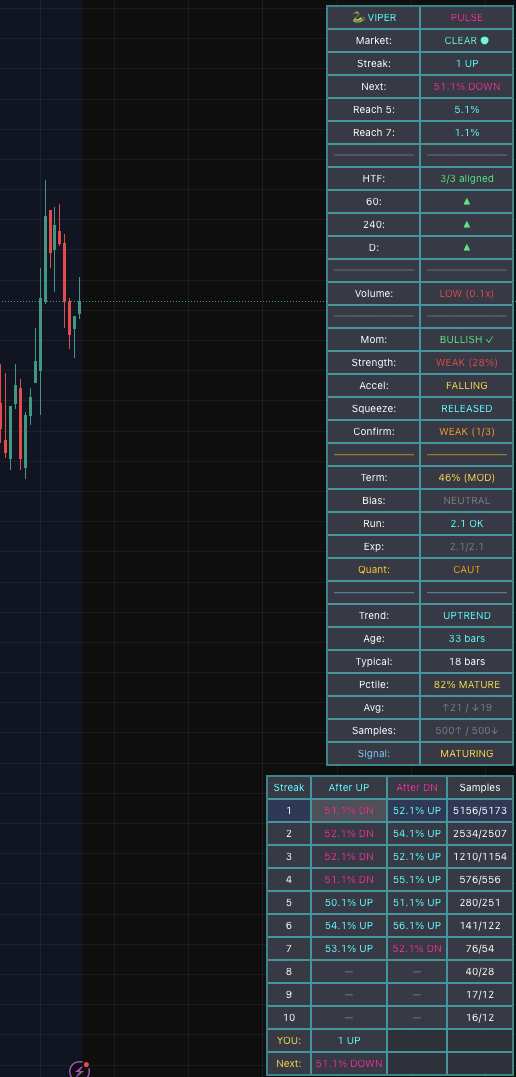
Pulse tracks streaks, measures the odds that they continue, and shows where you are in the trend. All on your TradingView chart.
The gap
Retail vs institutional
Hedge funds and prop shops don't trade on vibes. They use quantitative analysis: statistical models, probability calculations and multi-timeframe alignment.
That kind of analysis used to take expensive terminals, proprietary software and a team of quants. Retail traders were left with lagging indicators and gut feel.
Pulse puts a piece of that on your chart.
The difference
Beyond indicators
Most indicators tell you what happened. Pulse tells you how often it has kept happening.
Core features
What Pulse delivers
The tables
Everything at a glance
Context table
- Market state (CHOP vs CLEAR)
- Current streak and next bar probability
- Probability to reach 5 and 7 bar streaks
- HTF alignment status (0-3)
- Volume analysis (HIGH/NORMAL/LOW)
- Momentum direction, strength, and acceleration
- Squeeze state (COILED vs RELEASED)
- Termination pressure level
- Market bias (BULL/BEAR/NEUTRAL)
- Trend age and percentile
Streak table
- Historical continuation rates for streaks 1-10
- Separate columns for UP and DOWN streaks
- Sample counts for statistical confidence
- Your current streak highlighted
- Next-bar odds for the streak you are in
All probabilities are calculated from the actual historical data of the symbol you're trading.
How to use
Four things to check
Who it's for
Who gets the most from it
Data-driven traders
You want numbers, not feelings. Probabilities, not predictions.
Swing and position traders
Higher-timeframe alignment and bias matter most on trades held for hours to days.
Quality over quantity
Traders who'd rather take three good setups a week than thirty mediocre ones.
Get started
Know the odds.
Pulse is included in every plan, along with the other seven indicators.